Watts to Volts Conversion Calculator (W to V)
Enter the power and the current or resistance to get the voltage.
This watts to volts conversion calculator converts a power rating in watts into a voltage, but only when you also know either the current in amps or the resistance in ohms. Watts alone cannot give volts, so the tool asks for one of those two values alongside the power. Enter the power in W, kW or mW, choose your supply type for current-based calculations, and the voltage appears straight away.
It handles DC, single phase AC and three phase AC, and it also shows the matching current, resistance, apparent power and power for your inputs. It suits quick checks on heaters, motors and other loads. The calculator runs entirely in your browser, is free, and needs no sign-up. Nothing you type is uploaded.
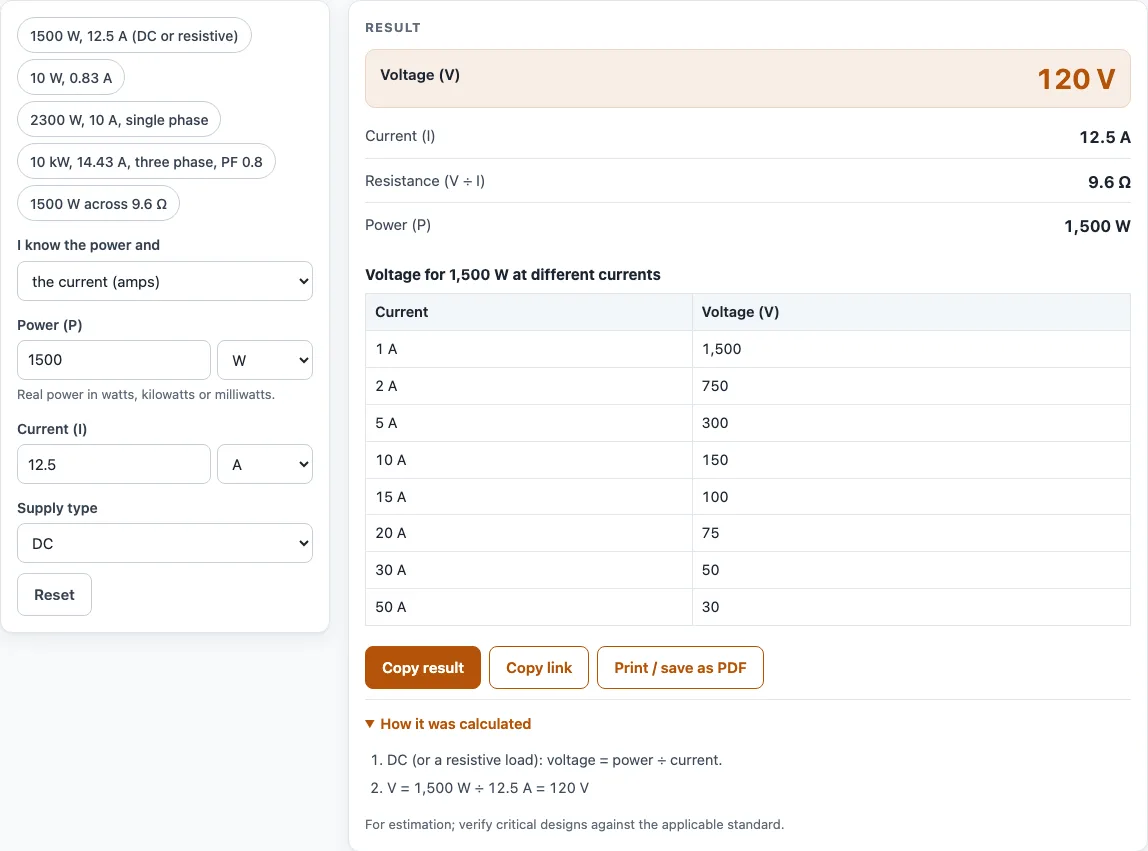
How to use the Watts to Volts Calculator
- Open the “I know the power and” drop-down and choose the current (amps) or the resistance (ohms).
- In the Power (P) field, type the power and pick its unit: W, kW or mW.
- If you chose current, type the Current (I) in A or mA. If you chose resistance, type the Resistance (R) in Ω, kΩ or mΩ.
- In current mode, open the Supply type drop-down and choose DC, Single phase AC or Three phase AC.
- For either AC option, enter the Power factor (PF). Use 1 for resistive loads such as a heater element, and the nameplate value for motors.
- Read the result rows: Voltage (V), Current (I), Resistance (V ÷ I), Apparent power (S) and Power (P). Only the rows that suit your mode appear. If a warning shows, check your units and values.
To try the tool quickly, press one of the example buttons above the form, such as 10 W at 0.83 A, which gives about 12 V. Below the result, a table lists the voltage for your power at 1, 2, 5, 10, 15, 20, 30 and 50 A, and “How it was calculated” shows every step with your numbers.
Copy result copies the result lines with a link, and Copy link stores all your inputs in the page address so the same calculation reopens later. Print / save as PDF includes the inputs, results, steps and date. Reset restores the starting example.
How do you convert watts to volts?
Watts become volts by dividing by current, because power equals voltage times current (P = V × I). Rearranged for a DC circuit, V = P ÷ I. For a 1,500 W load drawing 12.5 A, the voltage is 1,500 ÷ 12.5 = 120 V.
For AC, the voltage and current may not rise and fall together, so the power factor enters the formula. Single phase AC uses V = P ÷ (I × PF). The tool’s example of 2,300 W at 10 A gives 230 V with a power factor of 1. With a power factor of 0.8 and the same watts and amps, the result is 287.5 V, which shows why the power factor matters.
Power and voltage do not fix each other. The same 100 W can be 12 V at 8.33 A or 120 V at 0.833 A, so the current you enter decides the answer. The current table under the result shows this effect across several currents.
How do you convert wattage to volts?
Wattage to volts is the same conversion: divide the wattage by the current, V = P ÷ I, or use the resistance with V = √(P × R). The calculator takes the wattage in W, kW or mW, so a 2 kW heater drawing 8.7 A works out at about 230 V. Choose the supply type first, because single phase and three phase AC change the formula.
Can you convert watts to volts without amps?
Yes, if you know the resistance instead of the current. For a resistive load, V = √(P × R). So 1,500 W across 9.6 Ω gives √(1,500 × 9.6) = √14,400 = 120 V. The same values give the current with I = √(P ÷ R), which here is 12.5 A.
This route assumes a resistive load, treated as DC or as AC with a power factor of 1. It does not suit motors or other loads where the voltage and current are out of step, because those need the current value. If you have neither the amps nor the ohms, the watts cannot be converted to volts.
Worked examples
| Input | Result |
|---|---|
| 1500 W, 12.5 A | 120 V |
| 100 W, 10 A | 10 V |
| 2300 W, 10 A, PF 1 | 230 V |
| 10 kW, 14.43 A, PF 0.8 | 500.1 V |
| 1500 W, 9.6 Ω | 120 V |
Calculated by the tool above with these values.
Frequently asked questions
How many volts is 100 watts?
There is no single answer, because the voltage depends on the current. At 8.33 A, 100 W is about 12 V, and at 0.833 A it is 120 V. Enter your own current into the calculator to get the value for your circuit.
What voltage is 10 watts?
It depends on the current as well. At 0.83 A, 10 W gives about 12 V, which is one of the example buttons on the page. At 1 A, the same 10 W gives 10 V.
How do you convert watts to volts in a three-phase circuit?
Use the line-to-line formula V = P ÷ (√3 × I × PF). Enter the power, the current and the power factor, then choose Three phase AC. For example, 10 kW at 14.43 A with a power factor of 0.8 gives about 500 V line-to-line.
What power factor should I use?
Use 1 for resistive loads such as heater elements. For motors, use the power factor on the nameplate. The Power factor (PF) field appears only for the AC supply types.
Why does the calculator show a warning?
A warning appears when the voltage comes out below 1 V or above 1,000 V. This usually means a wrong unit or value, so check the power and current first.
Can I use the results in a quote or report?
Yes. Results, charts and printouts may be used freely in commercial work such as quotes, proposals, reports and service records. No attribution is needed. The note under every result says “For estimation; verify critical designs against the applicable standard.” Yes. Results, charts and printouts can be used freely in commercial work such as quotes, proposals, reports and service records, with no attribution needed. The calculator notes that results are for estimation, so verify critical designs against the applicable standard.
Related tools
- Watts to amps calculator: use it when you know the watts and volts and need the current.
- Ohm’s law calculator: use it to work through voltage, current and resistance together.
- kW to amps calculator: use it when your power is given in kilowatts and you need amps.
- Three phase power calculator: use it for loads on a three phase supply.
- Power factor calculator: use it when you need the power factor for a load.
- All electrical calculators: browse the full set of tools.
Sources
- OpenStax University Physics Vol. 2, §9.5 Electrical energy and power: P = V × I and P = V² ÷ R
- OpenStax University Physics Vol. 2, §15.4 Power in an AC circuit: power factor and AC power